Slides: Structuring the Unstructured - Cedric Clyburn, Red Hat
Source Video
Structuring the Unstructured - Cedric Clyburn, Red Hat
Relationship To World's Fair 2026
These slides are extracted from a public AI Engineer YouTube video connected to World's Fair 2026. Speaker-matched clips are supporting context unless later confirmed as exact session recordings; official livestream recordings are day-level/event-level source material.
Related Scheduled Sessions
- No individual scheduled session mapping has been assigned yet; treat this as an event livestream deck.
Extracted Slides
- Recreated text/layout view: open HTML recreation
- AI slide classifier:
content_slideconfidence0.97 - Text source: agent_vision.
Slide text:
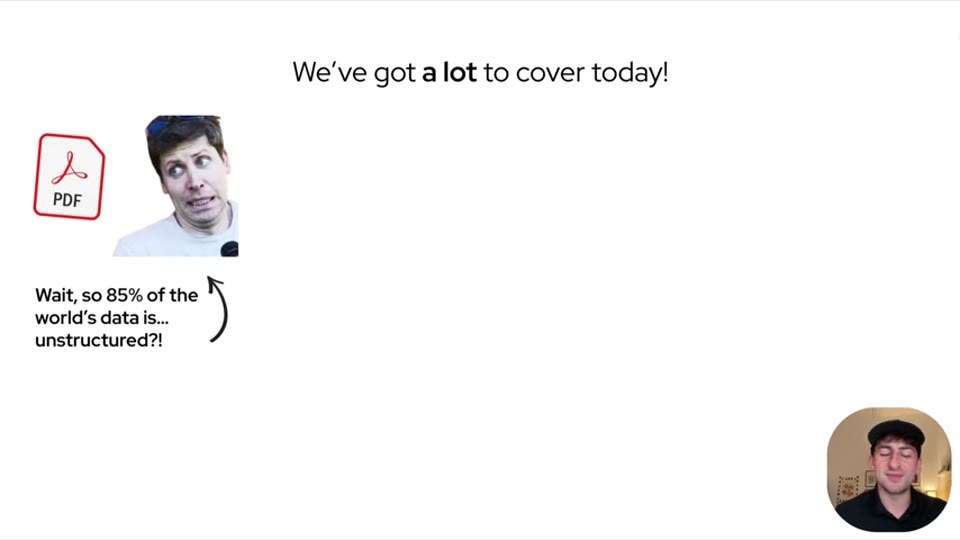
We've got a lot to cover today!
Wait, so 85% of the world's data is... unstructured?!
- Recreated text/layout view: open HTML recreation
- AI slide classifier:
content_slideconfidence0.96 - Text source: agent_vision.
Slide text:
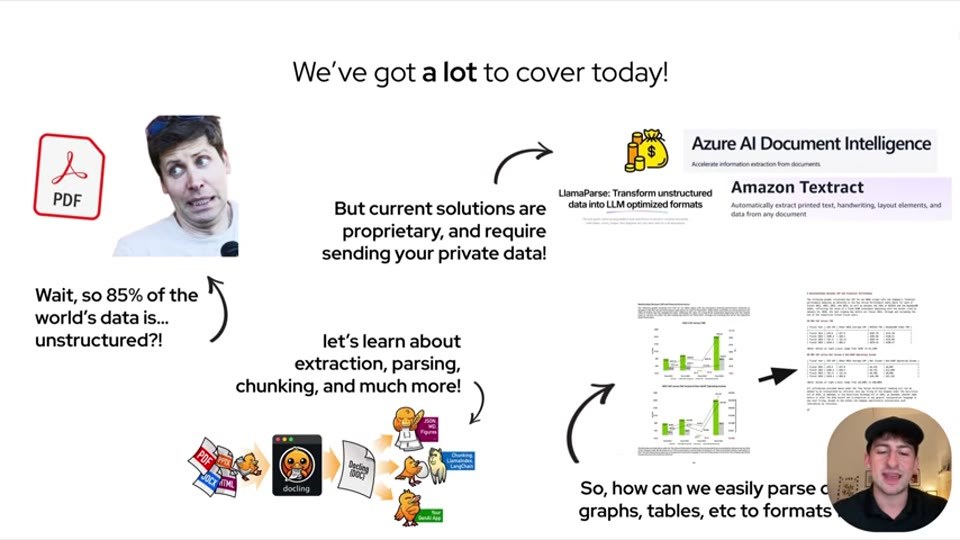
We've got a lot to cover today!
But current solutions are proprietary, and require sending your private data!
let's learn about extraction, parsing, chunking, and much more!
So, how can we easily parse charts, graphs, tables, etc to formats
- Recreated text/layout view: open HTML recreation
- AI slide classifier:
content_slideconfidence0.98 - Text source: agent_vision.
Slide text:
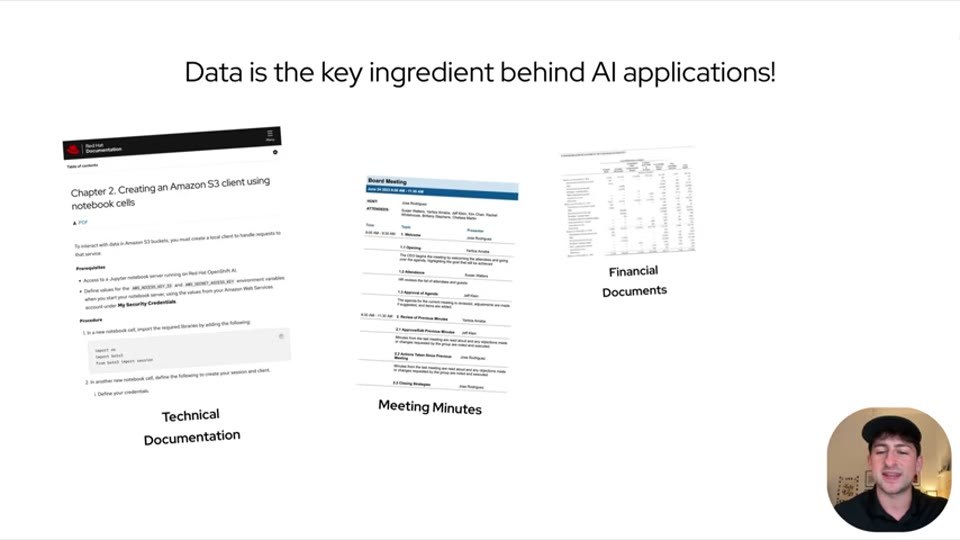
Data is the key ingredient behind AI applications!
Technical Documentation
Meeting Minutes
Financial Documents
- Recreated text/layout view: open HTML recreation
- AI slide classifier:
content_slideconfidence0.98 - Text source: agent_vision.
Slide text:
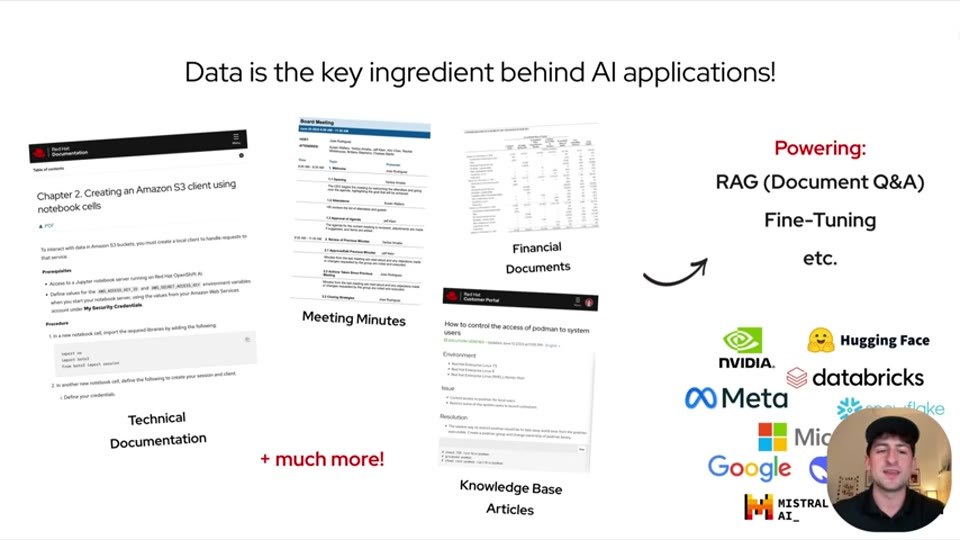
Data is the key ingredient behind AI applications!
Technical Documentation
Meeting Minutes
Financial Documents
Knowledge Base Articles
Powering:
RAG (Document Q&A)
Fine-Tuning
etc.
+ much more!
- Recreated text/layout view: open HTML recreation
- AI slide classifier:
content_slideconfidence0.97 - Text source: agent_vision.
Slide text:
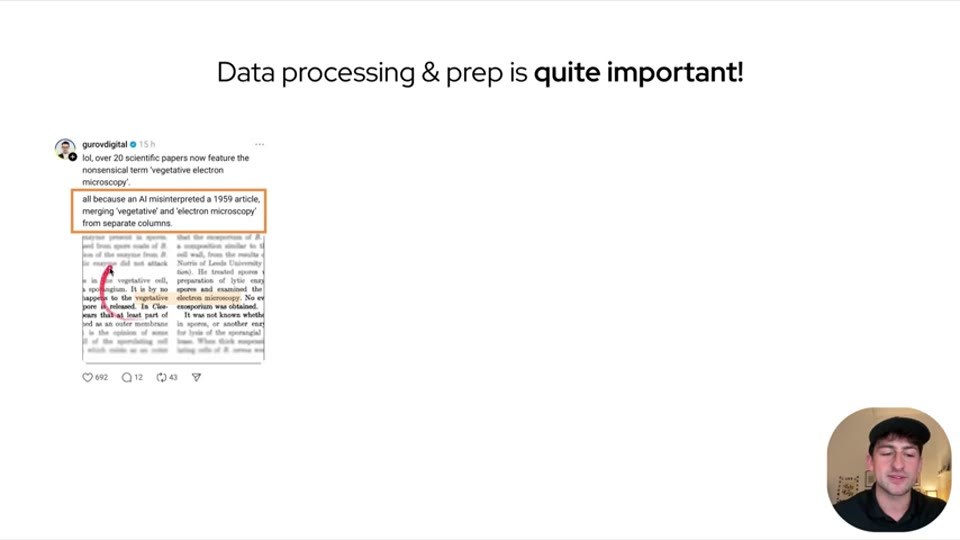
Data processing & prep is quite important!
- Recreated text/layout view: open HTML recreation
- AI slide classifier:
content_slideconfidence0.98 - Text source: advanced OCR
rapidocr-live/bright-screen/opencv-adaptivereconciled by agent. - OCR decision: ready — Dense embedded text excerpts and a highlighted quote make this OCR-suitable.
Slide text:
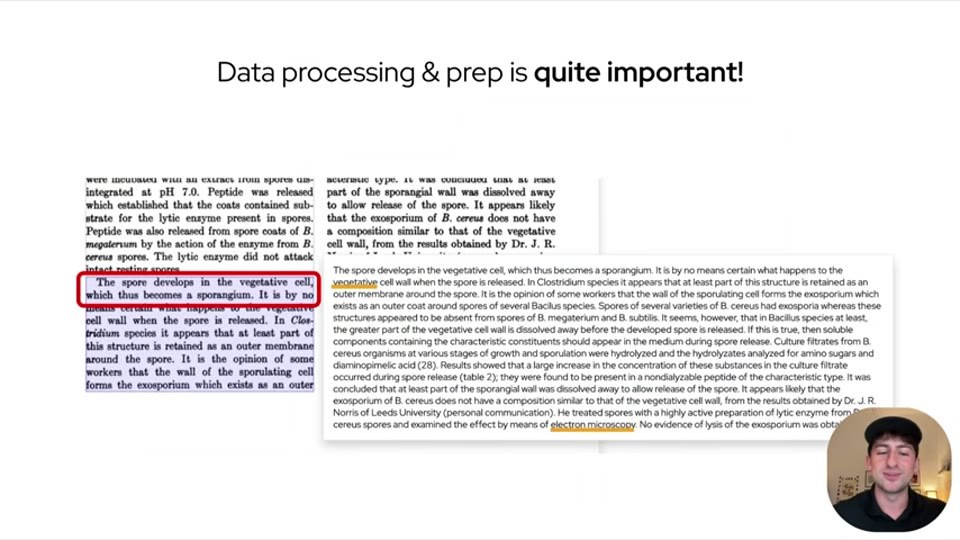
Data processing & prep is quite important!
- Recreated text/layout view: open HTML recreation
- AI slide classifier:
content_slideconfidence0.98 - Text source: agent_vision.
Slide text:
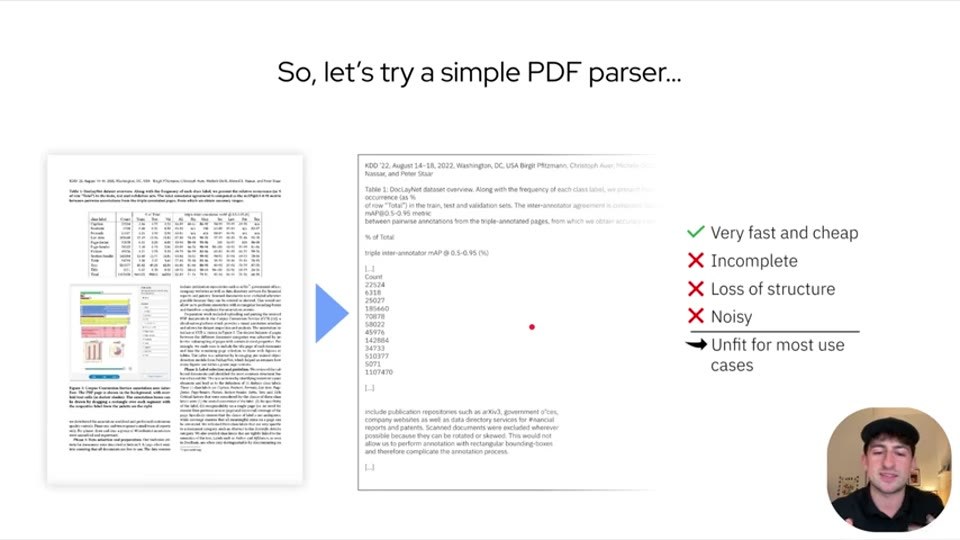
So, let’s try a simple PDF parser...
Very fast and cheap
Incomplete
Loss of structure
Noisy
Unfit for most use cases
- Recreated text/layout view: open HTML recreation
- AI slide classifier:
content_slideconfidence0.98 - Text source: advanced OCR
rapidocr-live/bright-screen/opencv-adaptivereconciled by agent. - OCR decision: ready — The slide contains multiple dense document screenshots and small table text that are better suited to OCR.
Slide text:
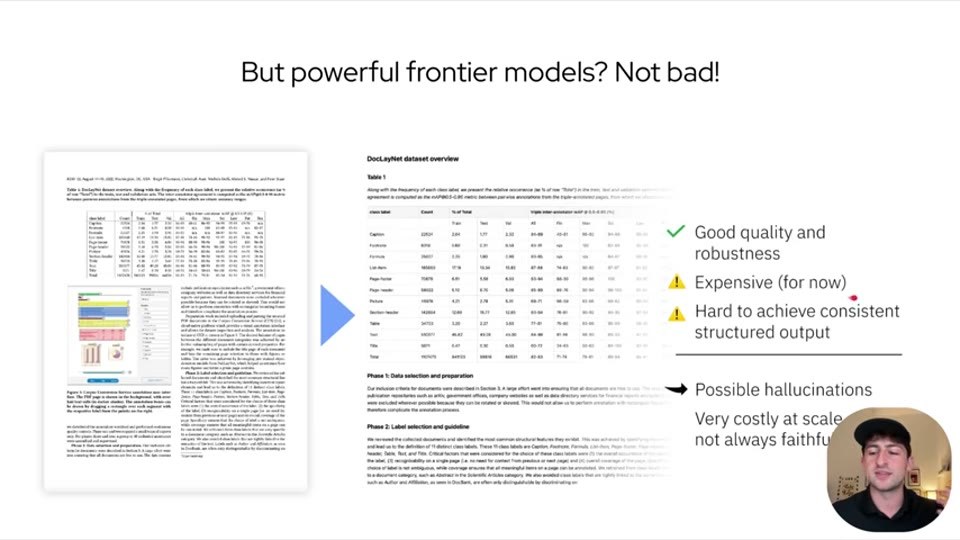
But powerful frontier models? Not bad!
Good quality and robustness
Expensive (for now)
Hard to achieve consistent structured output
Possible hallucinations
Very costly at scale
not always faithful
- Recreated text/layout view: open HTML recreation
- AI slide classifier:
content_slideconfidence0.98 - Text source: agent_vision.
Slide text:
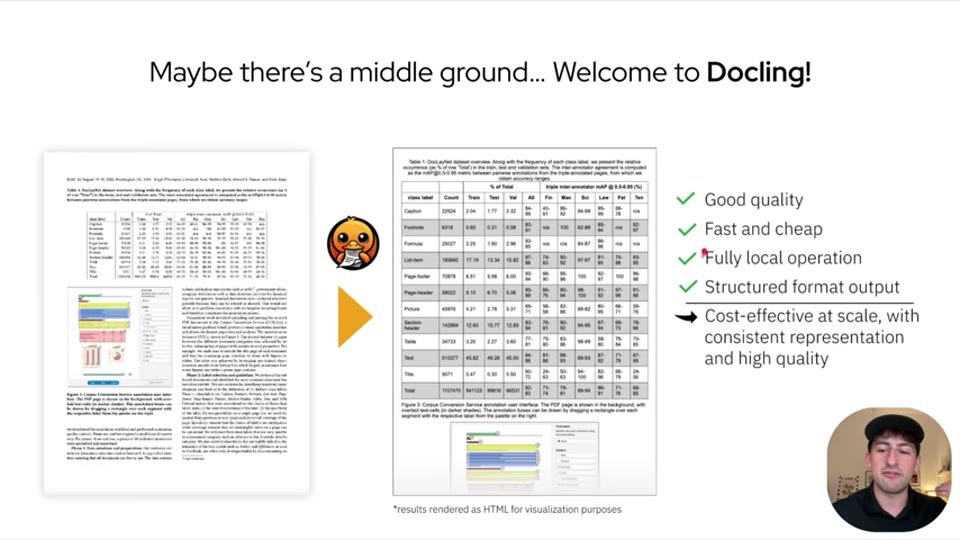
Maybe there’s a middle ground... Welcome to Docling!
- Recreated text/layout view: open HTML recreation
- AI slide classifier:
content_slideconfidence0.99 - Text source: agent_vision.
Slide text:
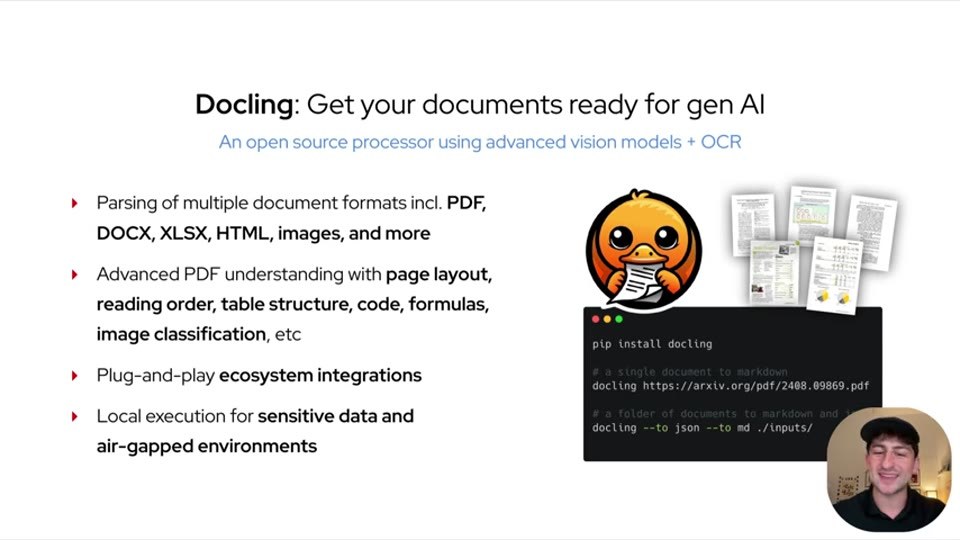
Docling: Get your documents ready for gen AI
An open source processor using advanced vision models + OCR
Parsing of multiple document formats incl. PDF, DOCX, XLSX, HTML, images, and more
Advanced PDF understanding with page layout, reading order, table structure, code, formulas, image classification, etc
Plug-and-play ecosystem integrations
Local execution for sensitive data and air-gapped environments
- Recreated text/layout view: open HTML recreation
- AI slide classifier:
content_slideconfidence0.98 - Text source: advanced OCR
rapidocr-live/bright-screen/opencv-adaptivereconciled by agent. - OCR decision: ready — The slide has a complex flowchart, small table text, and dense metrics that are better handled by OCR.
Slide text:
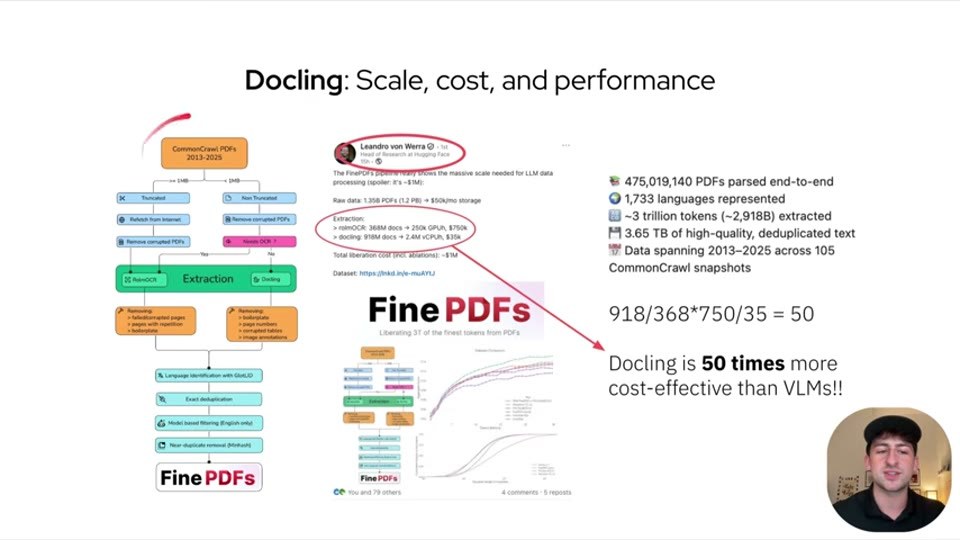
Docling: Scale, cost, and performance
475,019,140 PDFs parsed end-to-end
1,733 languages represented
~3 trillion tokens (~2,918B) extracted
3.65 TB of high-quality, deduplicated text
Data spanning 2013-2025 across 105 CommonCrawl snapshots
918/368*750/35 = 50
Docling is 50 times more
cost-effective than VLMs!!
- Recreated text/layout view: open HTML recreation
- AI slide classifier:
content_slideconfidence0.99 - Text source: advanced OCR
rapidocr-live/bright-screen/contrastreconciled by agent. - OCR decision: ready — Dense multi-panel slide with small code, chart, table, and paragraph text.
Slide text:
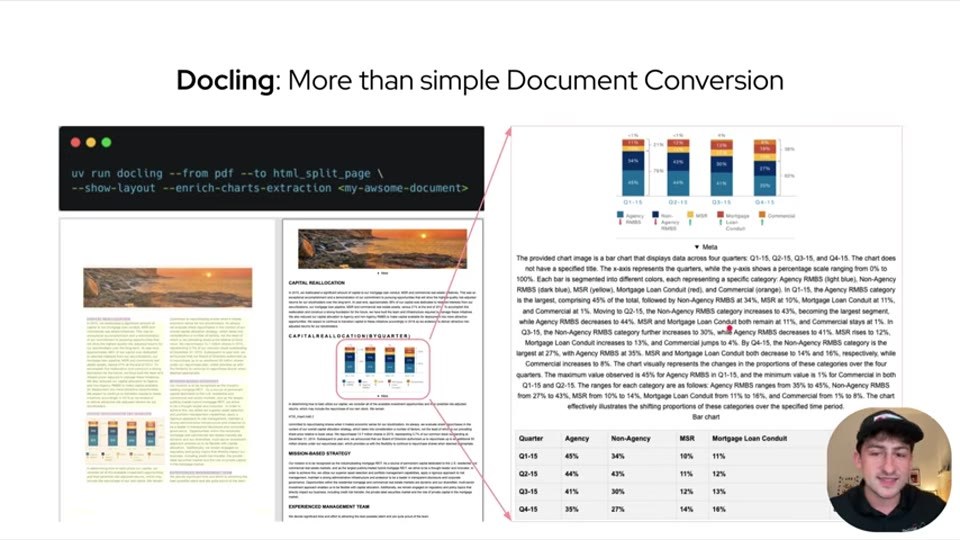
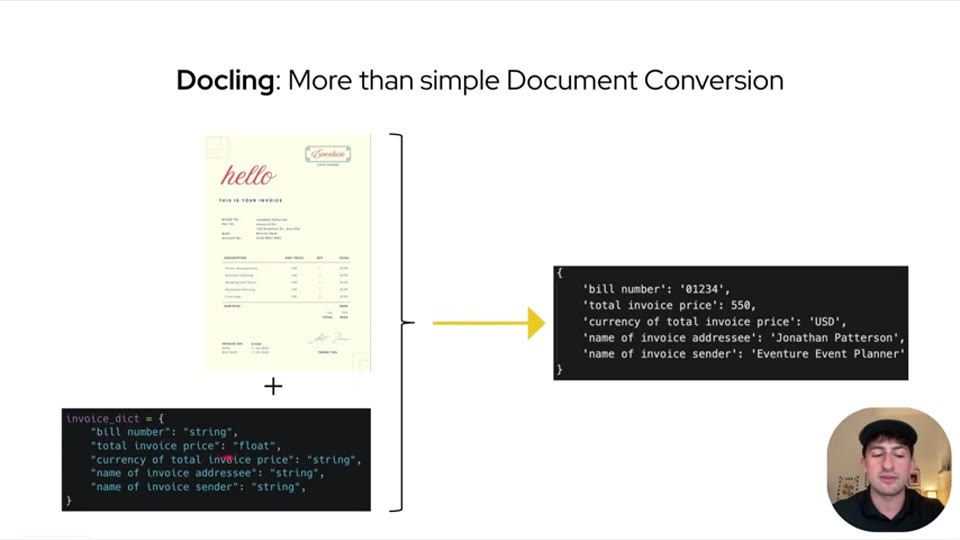
Docling: More than simple Document Conversion
Quarter Agency Non-Agency MSR Mortgage Loan Conduit
Q1-15 45% 34% 10% 11%
Q2-15 44% 43% 11% 12%
Q3-15 41% 30% 12% 13%
Q4-15 35% 27% 14% 16%
- Recreated text/layout view: open HTML recreation
- AI slide classifier:
content_slideconfidence0.99 - Text source: advanced OCR
rapidocr-live/center-82/contrastreconciled by agent. - OCR decision: ready — Document extraction example with code, form image, and structured output text that benefits from OCR.
Slide text:
Docling: More than simple Document Conversion
invoice_dict = {
'bill number': 'string',
'total invoice price': 'float',
'currency of total invoice price': 'string',
'name of invoice addressee': 'string',
'name of invoice sender': 'string'
}
{
'bill number': '01234',
'total invoice price': 550,
'currency of total invoice price': 'USD',
'name of invoice addressee': 'Jonathan Patterson',
'name of invoice sender': 'Eventure Event Planner'
}
- Recreated text/layout view: open HTML recreation
- AI slide classifier:
content_slideconfidence0.98 - Text source: advanced OCR
rapidocr-live/bright-screen/opencv-adaptivereconciled by agent. - OCR decision: ready — Repository screenshot with many small UI labels and file names that are better handled by OCR.
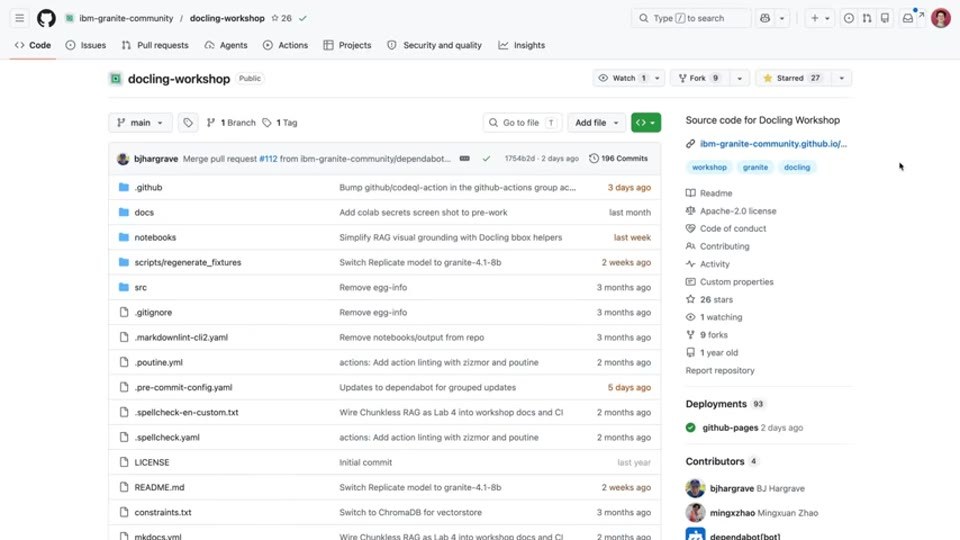
Slide text:
bm-granite-community / docling-workshop
docling-workshop
Source code for Docling Workshop
.github
docs
notebooks
scripts/regenerate_fixtures
src
- Recreated text/layout view: open HTML recreation
- AI slide classifier:
content_slideconfidence0.99 - Text source: advanced OCR
rapidocr-live/fullreconciled by agent. - OCR decision: ready — Notebook/code slide with dense imports and code cells that are OCR-suitable.
Slide text:
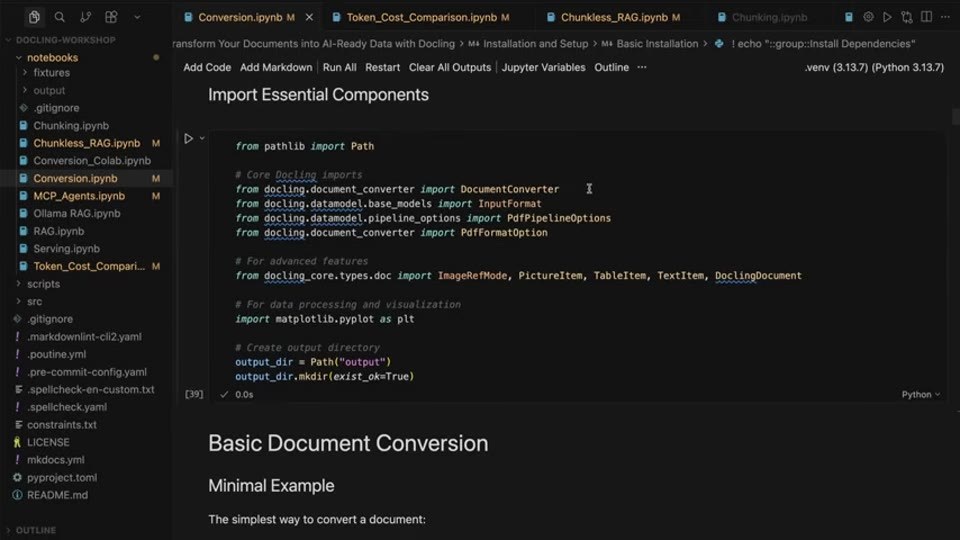
Import Essential Components
from pathlib import Path
# Core Docling imports
from docling.document_converter import DocumentConverter
from docling.datamodel.base_models import InputFormat
from docling.datamodel.pipeline_options import PdfPipelineOptions
from docling.document_converter import PdfFormatOption
# For advanced features
from docling_core.types.doc import ImageRefMode, PictureItem, TableItem, TextItem, DoclingDocument
# For data processing and visualization
import matplotlib.pyplot as plt
# Create output directory
output_dir = Path("output")
output_dir.mkdir(exist_ok=True)
Basic Document Conversion
Minimal Example
The simplest way to convert a document:
- Recreated text/layout view: open HTML recreation
- AI slide classifier:
content_slideconfidence0.99 - Text source: advanced OCR
rapidocr-live/fullreconciled by agent. - OCR decision: ready — Notebook and PDF viewer screenshot with embedded code and small text requiring OCR.
Slide text:
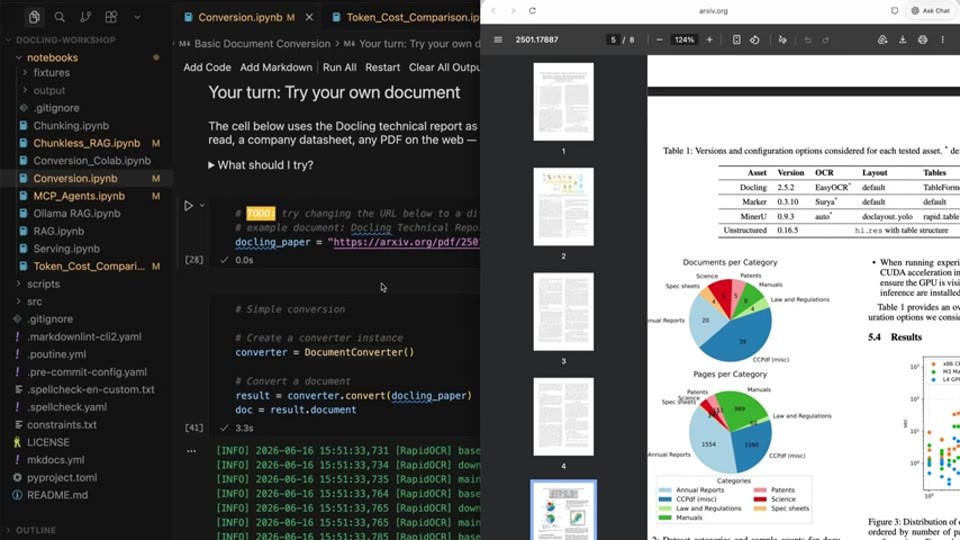
Your turn: Try your own document
What should I try?
Try changing the URL below to a different document.
docling_paper = "https://arxiv.org/pdf/2501.17887"
- Recreated text/layout view: open HTML recreation
- AI slide classifier:
content_slideconfidence0.99 - Text source: advanced OCR
rapidocr-live/fullreconciled by agent. - OCR decision: ready — Notebook slide with code and multi-section text that is better extracted via OCR.
Slide text:
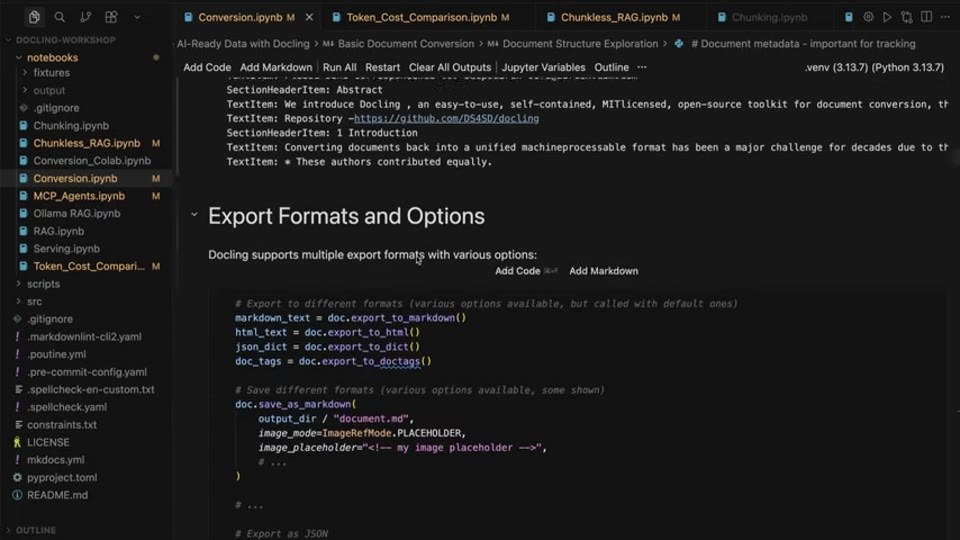
Export Formats and Options
Docling supports multiple export formats with various options:
# Export to different formats (various options available, but called with default ones)
markdown_text = doc.export_to_markdown()
html_text = doc.export_to_html()
json_dict = doc.export_to_dict()
doc_tags = doc.export_to_doctags()
# Save different formats (various options available, some shown)
doc.save_as_markdown(
image_mode=ImageRefMode.PLACEHOLDER,
image_placeholder="<!-- my image placeholder -->",
...
)
- Recreated text/layout view: open HTML recreation
- AI slide classifier:
content_slideconfidence0.91 - Text source: advanced OCR
rapidocr-live/fullreconciled by agent. - OCR decision: ready — Dense notebook screenshot with tables and small text.
Slide text:
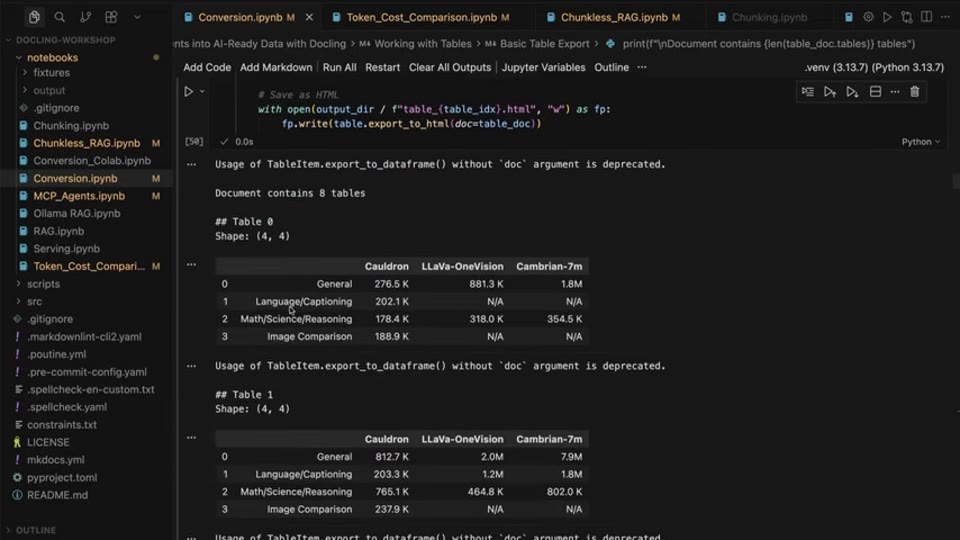
Documents into AI-Ready Data with Docling > M4 Working with Tables > M4 Basic Table Export
# Save as HTML
with open(output_dir / f"table_{table_idx}.html", "w") as fp:
fp.write(table.export_to_html(doc=table_doc))
Usage of TableItem.export_to_dataframe() without
docargument is deprecated.Document contains 8 tables
## Table 0
Shape: (4, 4)
General | LLaVa-OneVision | Cambrian-7m
0 General | 276.5K | 881.3K | 1.8M
1 Language/Captioning | 202.1K | N/A | N/A
2 Math/Science/Reasoning | 178.4K | 318.0K | 354.5K
3 Image Comparison | 188.9K | N/A | N/A
Usage of TableItem.export_to_dataframe() without
docargument is deprecated.## Table 1
Shape: (4, 4)
General | LLaVa-OneVision | Cambrian-7m
0 General | 812.7K | 2.0M | 7.9M
1 Language/Captioning | 203.3K | 1.2M | 1.8M
2 Math/Science/Reasoning | 765.1K | 464.8K | 802.0K
3 Image Comparison | 237.9K | N/A | N/A
- Recreated text/layout view: open HTML recreation
- AI slide classifier:
content_slideconfidence0.98 - Text source: advanced OCR
rapidocr-live/right-72/opencv-adaptivereconciled by agent. - OCR decision: ready — Code-heavy slide screenshot with small body text.
Slide text:
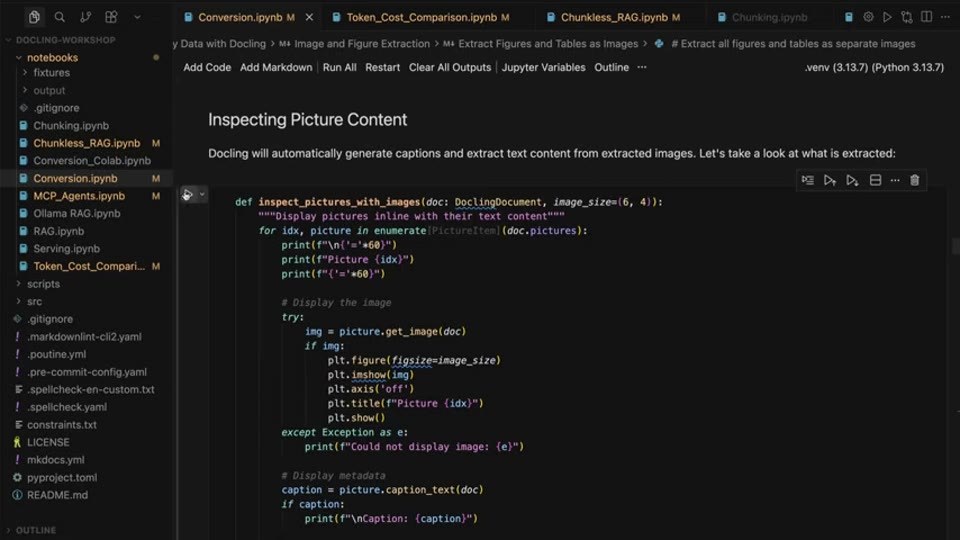
Inspecting Picture Content
Docling will automatically generate captions and extract text content from extracted images. Let's take a look at what is extracted:
def inspect_pictures_with_images(doc: DoclingDocument, image_size=(6, 4)):
"""Display pictures inline with their text content."""
for idx, picture in enumerate(doc.pictures):
print(f"\n{'='*60}")
print(f"Picture {idx}")
print(f"{'='*60}")
# Display the image
try:
img = picture.get_image(doc)
if img:
plt.figure(figsize=image_size)
plt.imshow(img)
plt.axis("off")
plt.title(f"Picture {idx}")
plt.show()
except Exception as e:
print(f"Could not display image: {e}")
# Display metadata
caption = picture.caption_text(doc)
if caption:
print(f"\nCaption: {caption}")
- Recreated text/layout view: open HTML recreation
- AI slide classifier:
content_slideconfidence0.97 - Text source: advanced OCR
rapidocr-live/bright-screen/opencv-adaptivereconciled by agent. - OCR decision: ready — Code-heavy notebook screenshot with small UI text and embedded document preview.
Slide text:
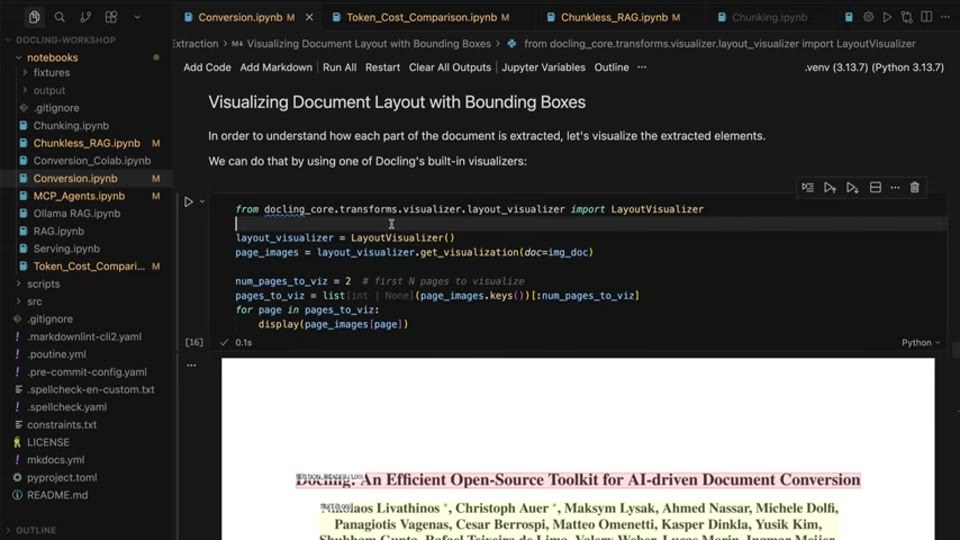
Visualizing Document Layout with Bounding Boxes
In order to understand how each part of the document is extracted, let's visualize the extracted elements.
We can do that by using one of Docling's built-in visualizers:
from docling_core.transforms.visualizer.layout_visualizer import LayoutVisualizer
layout_visualizer = LayoutVisualizer()
page_images = layout_visualizer.get_visualization(doc=img_doc)
num_pages_to_viz = 2 # first N pages to visualize
pages_to_viz = list(page_images.keys())[:num_pages_to_viz]
for page in pages_to_viz:
display(page_images[page])
- Recreated text/layout view: open HTML recreation
- AI slide classifier:
content_slideconfidence0.96 - Text source: advanced OCR
rapidocr-live/bright-screen/opencv-adaptivereconciled by agent. - OCR decision: ready — Dense code screenshot with small parameter text and API configuration details.
Slide text:
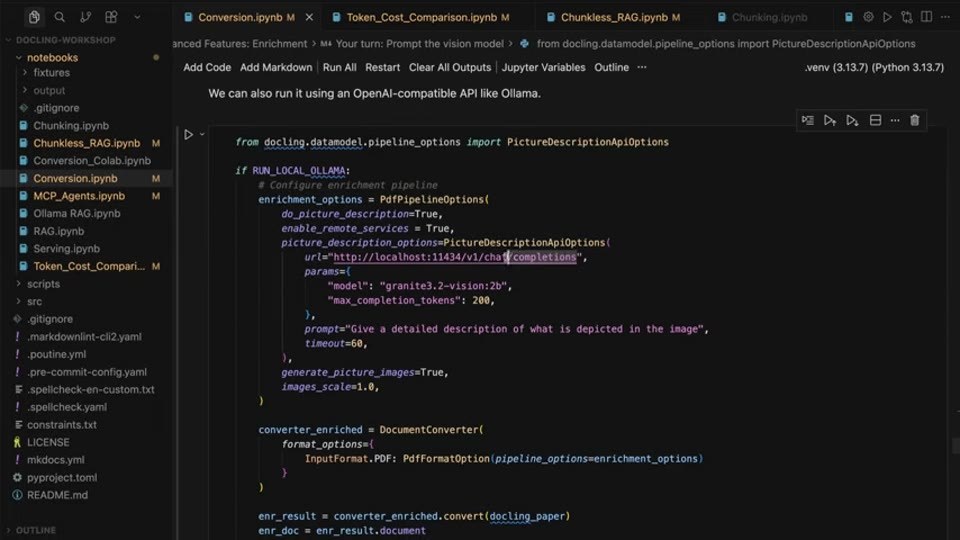
We can also run it using an OpenAI-compatible API like Ollama.
from docling.datamodel.pipeline_options import PictureDescriptionApiOptions
if RUN_LOCAL_OLLAMA:
# Configure enrichment pipeline
enrichment_options = PdfPipelineOptions(
do_picture_description=True,
enable_remote_services=True,
picture_description_options=PictureDescriptionApiOptions(
url="http://localhost:11434/v1/chat/completions",
params={
"model": "granite3.2-vision:2b",
"max_completion_tokens": 200,
},
prompt="Give a detailed description of what is depicted in the image",
timeout=60,
),
generate_picture_images=True,
images_scale=1.0,
)
converter_enriched = DocumentConverter(
format_options={
InputFormat.PDF: PdfFormatOption(pipeline_options=enrichment_options)
}
)
enr_result = converter_enriched.convert(docling_paper)
enr_doc = enr_result.document
- Recreated text/layout view: open HTML recreation
- AI slide classifier:
content_slideconfidence0.98 - Text source: advanced OCR
rapidocr-live/fullreconciled by agent. - OCR decision: ready — Diagram slide with multiple small labels and explanatory text that is better handled by OCR.
Slide text:
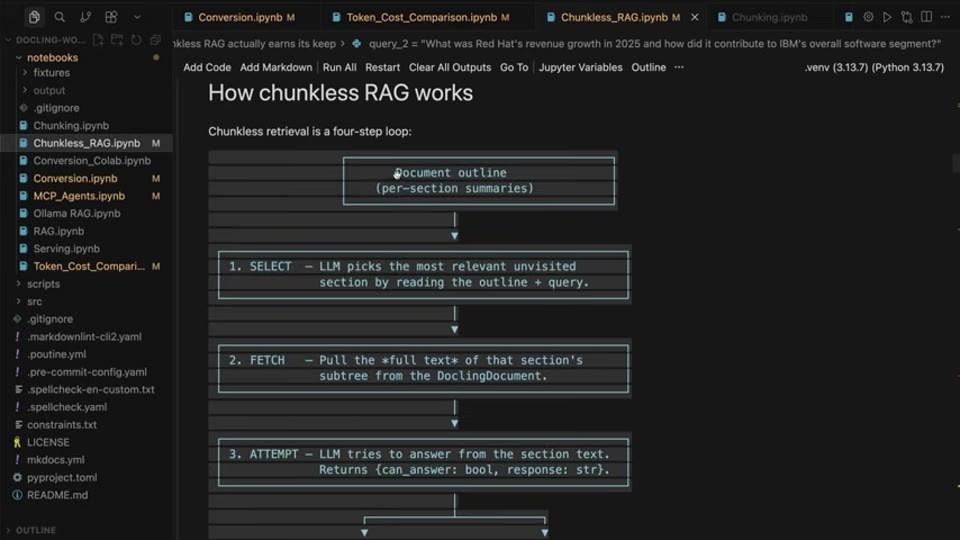
How chunkless RAG works
Chunkless retrieval is a four-step loop:
Document outline
(per-section summaries)
1. SELECT — LLM picks the most relevant unvisited
section by reading the outline + query.
2. FETCH — Pull the full text of that section's
subtree from the DoclingDocument.
3. ATTEMPT — LLM tries to answer from the section text.
Returns (can_answer: bool, response: str).
- Recreated text/layout view: open HTML recreation
- AI slide classifier:
content_slideconfidence0.98 - Text source: advanced OCR
rapidocr-live/fullreconciled by agent. - OCR decision: ready — Continuation of a diagram slide with small labels and paragraph text; OCR is likely the cheapest accurate read.
Slide text:
RAG actually earns its keep
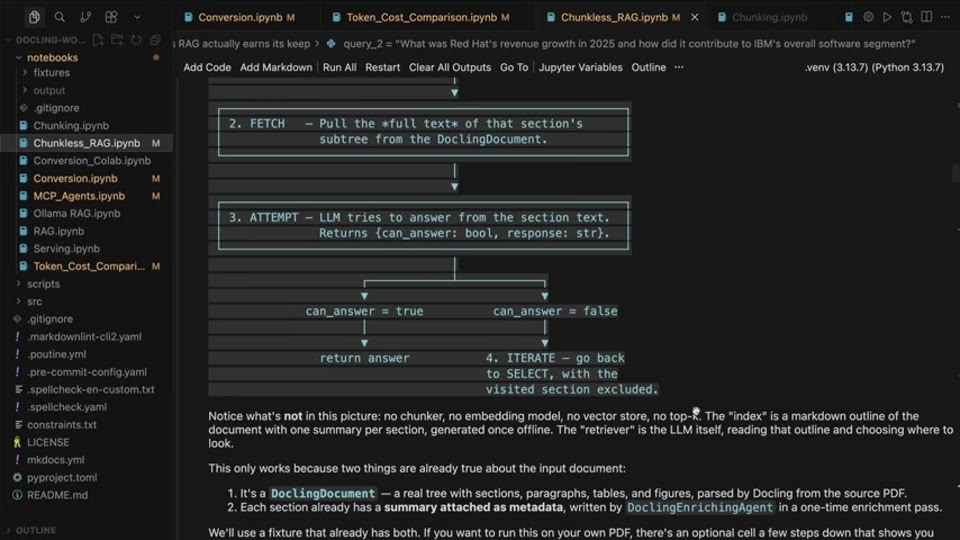
2. FETCH — Pull the full text of that section's subtree from the DoclingDocument.
3. ATTEMPT — LLM tries to answer from the section text.
Returns {can_answer: bool, response: str}.
can_answer = true
return answer
can_answer = false
4. ITERATE — go back to SELECT, with the visited section excluded.
Notice what's not in this picture: no chunker, no embedding model, no vector store, no top-k. The "index" is a markdown outline of the document with one summary per section, generated once offline. The "retriever" is the LLM itself, reading that outline and choosing where to look.
This only works because two things are already true about the input document:
1. It's a DoclingDocument — a real tree with sections, paragraphs, tables, and figures, parsed by Docling from the source PDF.
2. Each section already has a summary attached as metadata, written by DoclingEnrichingAgent in a one-time enrichment pass.
We'll use a fixture that already has both. If you want to run this on your own PDF, there's an optional cell a few steps down that shows you
Hidden Non-Slide Evidence
- `slide-001.jpg` —
title_cardconfidence0.98; title-only intro card; not content-heavy.
Classification audit: raw/sources/slide-ai-classification/slides/-x5GEVnkuRw/audit.json
Slide-Derived Subjects To Review
Subject extraction uses video title, related session titles/descriptions, transcript context, and OCR text when available. OCR is best-effort and should be reviewed against the embedded slide images.